Introduction
In 2026, the Malaysian gaming community has seen significant growth, with many gamers relying on their Android devices for immersive experiences. One of the critical factors affecting gaming performance is network speed. A slow or unstable connection can lead to frustrating lag, disconnections, and an overall lackluster gaming experience. Understanding how to improve your network speed on Android can make a substantial difference, ensuring that you enjoy seamless gameplay whether you're battling it out in a multiplayer arena or exploring vast open worlds.
Understanding Network Speed
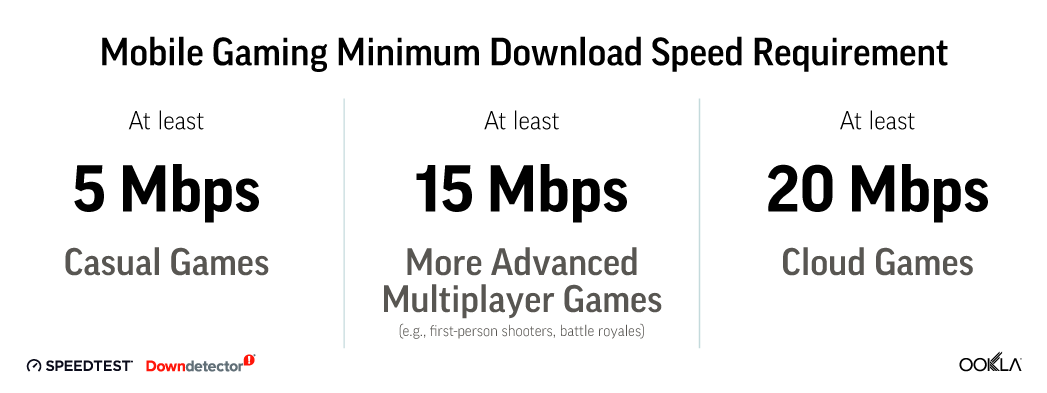
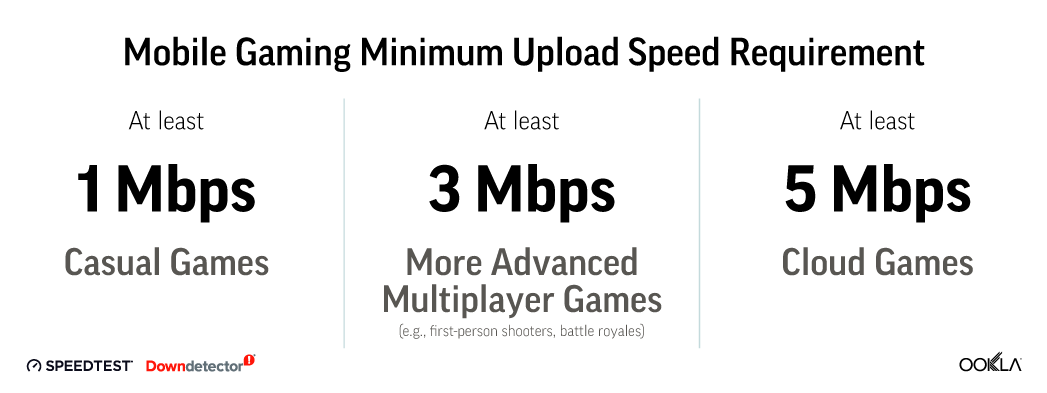
To appreciate the tips on improving your network speed, it's essential to understand some key terms. Network speed refers to the rate at which data is transmitted over your internet connection, typically measured in megabits per second (Mbps). Low network speed can lead to buffering, delayed reactions, and even disconnections during gameplay.
Another crucial aspect is latency, which is the time it takes for data to travel from your device to the game's server and back. High latency can cause noticeable delays, especially in fast-paced games. For Malaysian gamers, where internet infrastructure can be varied, understanding these factors is vital for enhancing gaming performance.
Tips for Improving Speed
Now that we've covered the basics, let's delve into practical tips for improving your network speed while gaming on Android.
- Optimize Your Wi-Fi Settings: Ensure your router is in a central location, away from obstructions. Use the 5GHz frequency band if your router supports it, as it offers faster speeds and less interference compared to the more common 2.4GHz band.
- Reduce Latency: Close background apps that may be using bandwidth and consider using Quality of Service (QoS) settings on your router to prioritize gaming traffic.
- Ensure Stable Connections: If possible, use an Ethernet connection instead of Wi-Fi. Wired connections are generally more stable and provide lower latency.
Adjusting Android Settings
There are specific Android settings you can tweak to enhance network performance:
- Turn Off Data Saver: While this feature can save data, it may also limit the performance of your gaming apps.
- Disable Adaptive Network: This setting can cause your device to switch between Wi-Fi and mobile data, which may lead to interruptions during gameplay.
- Update Your Device: Keeping your Android OS and gaming apps updated ensures you benefit from the latest performance enhancements and bug fixes.
Using Ethernet Over Wi-Fi
For serious gamers, using an Ethernet cable can be a game-changer. A wired connection drastically reduces latency and increases network speed, resulting in a more stable gaming experience. While it may not always be feasible for mobile gaming, considering a portable router with Ethernet capabilities can provide the best of both worlds. In Malaysia, where many gamers often rely on public Wi-Fi, having a portable solution can be beneficial during gaming meetups or tournaments.
Recommended Applications
In addition to optimizing your settings, certain applications can help improve your gaming speed and performance. Here are some recommended apps that Malaysians can benefit from:
- PingTools: This app helps you measure your ping and network speed. It provides a detailed analysis of your connection, allowing you to identify potential issues.
- Net Optimizer: This application helps optimize network settings specific to your device, ensuring better connectivity for gaming.
- VPN Services: While some may think a VPN can slow down the connection, reputable gaming VPNs can sometimes reduce ping and improve access to game servers, especially relevant for gamers in Malaysia connecting to international servers.
Network Optimization Tools
Several popular network optimization apps available on Android can enhance your gaming experience:
- Game Booster: This app allows you to optimize your device for gaming by freeing up RAM and prioritizing network traffic for games.
- Speedtest by Ookla: Regularly testing your internet speed can help you identify fluctuations and determine if your ISP is meeting your speed promises.
- Wi-Fi Analyzer: This tool helps you analyze your Wi-Fi network, allowing you to choose the best channel and reduce interference from other networks.

Conclusion
Improving your network speed for gaming on Android in 2026 is more essential than ever. By understanding key concepts like latency and network speed and implementing the tips discussed, you can significantly enhance your gaming experience. Whether you're adjusting your Android settings, using an Ethernet connection, or utilizing recommended applications, every step you take can lead to smoother gameplay and fewer frustrations. The Malaysian gaming community is vibrant, and every improvement you make can help elevate your gaming adventures. So, gear up, adjust your settings, and get ready to enjoy an optimized gaming experience!
FAQ
What apps can help improve gaming speed?
Apps like PingTools, Net Optimizer, and Game Booster are excellent for enhancing gaming speed and performance on Android devices.
How can I reduce lag in mobile gaming?
To reduce lag, consider optimizing your Wi-Fi settings, using a wired connection if possible, closing background apps, and ensuring your device is updated. Additionally, using network optimization tools can help identify and resolve issues affecting your gaming experience.