Understanding RAM
Random Access Memory (RAM) is a crucial component in your Android device. It acts as a temporary storage area that allows your device to access and run applications quickly. When you open an app, it gets loaded into RAM, enabling smooth performance and multitasking capabilities. In the vibrant gaming community of Malaysia, where mobile gaming has surged in popularity, understanding the role of RAM can significantly enhance your gaming experience. A well-managed RAM can lead to faster load times and smoother gameplay, which is essential for competitive gamers.
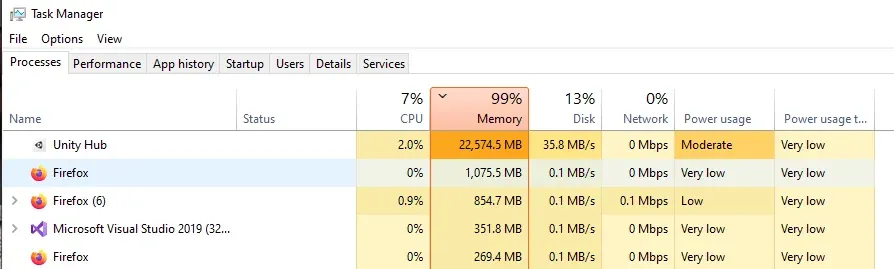
Why Free Up RAM?
Freeing up RAM provides several benefits, particularly for Android users who engage in resource-intensive tasks, such as gaming or streaming. By optimizing RAM, users can experience:
- Improved Performance: Freeing up RAM can enhance device performance by up to 30%, allowing games to run smoother without lag.
- Extended Battery Life: Less RAM usage can lead to lower energy consumption, thus preserving battery life during long gaming sessions.
- Faster App Launch Times: When RAM is adequately managed, apps can launch quicker, reducing wait times and keeping gamers engaged.

In Malaysia, with a growing number of mobile gamers, regular RAM management has become an essential practice. It not only improves the performance of gaming apps but also enhances the overall usability of your device.
Methods to Free Up RAM
Here are some practical methods that users can implement to free up RAM on their Android devices:
Close Background Apps
Many apps continue to run in the background, consuming valuable RAM. Identifying and closing these apps is a straightforward way to optimize your device's performance. To close background apps:
- Open the Recent Apps menu by tapping the square icon or using a swipe gesture.
- Swipe away the apps you want to close or tap the Close All button if available.
This simple step can clear a significant amount of RAM, allowing your games to run more smoothly. As you can see above, keeping background applications in check is one of the most effective methods to free up RAM.
Use Built-in Device Features
Most Android devices come with built-in features that help manage RAM efficiently. Here are a couple of settings you can utilize:
- Device Care: Navigate to Settings > Device Care > Memory. You can see how much RAM is being used and free up memory with a single tap.
- Developer Options: If you're comfortable, enable Developer Options by tapping the Build Number in About Phone seven times. Here, you can limit background processes, which can significantly reduce RAM usage.
Utilizing these built-in features not only helps manage RAM but also enhances your overall Android experience.
Recommended Apps
For those who prefer third-party solutions, several apps can assist in managing RAM efficiently:
- CCleaner: This app helps clear cache and stop background processes, freeing up RAM effectively.
- Greenify: This app hibernates apps you don’t use often, preventing them from consuming RAM in the background.
- SD Maid: A powerful tool for cleaning your device, SD Maid also offers memory optimization features.
Choosing the right app can make a significant difference in your device’s performance, especially if you’re into gaming and need every bit of RAM available.
What Causes High RAM Usage on Android?
Understanding what causes high RAM usage can help you take proactive measures to manage it better. Common culprits include:
- Heavy Apps: Gaming and multimedia apps typically consume more RAM than basic applications.
- Too Many Open Apps: Multitasking can lead to high RAM consumption, especially if you have multiple heavy apps running.
- Background Processes: Many apps run services in the background, consuming RAM even when you are not actively using them.
Being aware of these factors is crucial for gamers who rely on their devices for high-performance experiences.
The Impact of Background Apps
Background applications play a significant role in RAM usage and overall performance. When multiple apps are running in the background, they compete for memory resources, leading to lag and stutter in demanding applications such as games. This can result in:
- Increased Load Times: Games may take longer to load when RAM is maxed out.
- Reduced Frame Rates: High RAM usage can lead to frame drops, impacting your gaming performance.
- Application Crashes: Insufficient RAM can cause apps to crash, leading to a frustrating gaming experience.
To maintain optimal gaming performance, regularly managing background apps is essential. By implementing the methods discussed above, you can significantly improve your device's RAM performance and enjoy a smoother gaming experience.
FAQ
What apps can help free up RAM on Android?
Several applications can assist in freeing up RAM on Android devices, including CCleaner, Greenify, and SD Maid. Each of these apps has unique features that can help manage background processes and optimize your device's performance.
How often should I free up RAM on my Android?
It's advisable to free up RAM regularly, especially if you use resource-intensive applications frequently. For gamers, doing this before starting a gaming session can greatly enhance performance and responsiveness.
By understanding how to effectively manage RAM, Malaysian gamers can optimize their Android devices for a better gaming experience. Whether you're competing in a mobile esports tournament or enjoying casual gaming, keeping your RAM in check is crucial for peak performance.