Introduction
For many gamers in Malaysia, the thrill of mobile gaming often comes with an unfortunate downside: game crashes. Whether you're deep into a competitive match or exploring a vast open world, encountering a crash can be frustrating. In 2026, optimizing your Android device settings has never been more crucial for a smooth gaming experience. With the right adjustments, you can significantly reduce the likelihood of these interruptions.

Common Causes
Understanding the common causes of game crashes is the first step towards prevention. In fact, studies reveal that over 70% of Android game crashes are due to insufficient memory. Here are some frequent culprits:
- Hardware Limitations: Older devices or those with lower specifications may struggle to run demanding games smoothly.
- Software Bugs: Bugs in the game's code or conflicts with the Android operating system can lead to unexpected crashes.
- Outdated Games: Running an outdated version of a game can result in compatibility issues, causing frequent crashes.
Recommended Settings
Now that we know the common causes, let’s explore some recommended settings adjustments tailored for popular Android devices such as Samsung, Google, Xiaomi, and OnePlus. These tweaks can help you avoid game crashes:
Samsung Devices
- Navigate to Settings > Battery and Device Care > Performance and select Game Booster. This feature optimizes your device for gaming.
- Lower graphic settings within the game to reduce the load on your device’s GPU. This can decrease crashes by up to 50%.
Google Devices
- Go to Settings > Apps > [Your Game] > Storage and clear the cache regularly to improve performance.
- Ensure that your Android version is up to date by checking Settings > System > System Update.
Xiaomi Devices
- Access Settings > Battery & performance and enable Game Turbo for enhanced gaming performance.
- Adjust the Graphics settings in your game to a lower resolution if you experience crashes.
OnePlus Devices
- Open Settings > Battery > Battery Saver and set it to Gaming Mode for optimal resource allocation during gameplay.
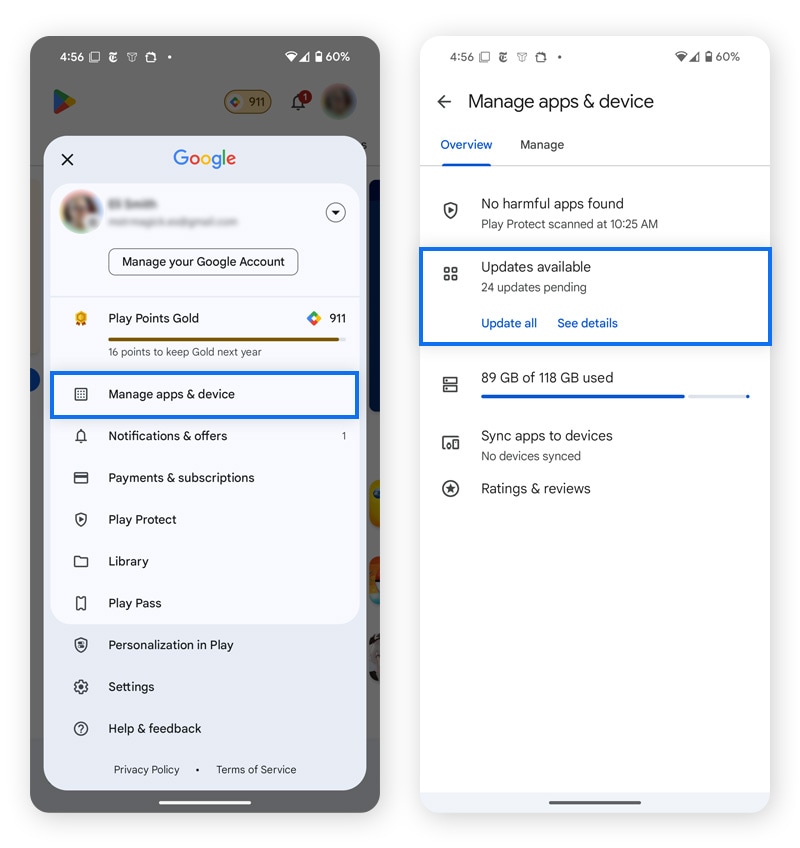
- Keep your games and apps updated through the Google Play Store to prevent compatibility issues.

Additional Tips
Alongside adjusting your device settings, consider these additional troubleshooting methods and performance optimization tips to minimize game crashes:
- Close Background Apps: Ensure no unnecessary applications are running in the background, as they consume RAM and processing power.
- Regularly Clear Cache: Clearing your device's cache can free up space and improve overall performance.
- Uninstall Unused Apps: If your device is running low on storage, uninstall apps you no longer use to allocate more resources for gaming.
- Use a VPN: If experiencing lag or disconnections, using a VPN can help stabilize your connection when gaming online.
Conclusion
In the ever-evolving world of mobile gaming, avoiding crashes on your Android device in 2026 is achievable with the right settings and practices. By understanding the common causes of game crashes and implementing the recommended settings for your specific device, you can significantly enhance your gaming experience. Remember to regularly clear your cache, close unnecessary apps, and keep your games updated. Start applying these tips today and enjoy uninterrupted gaming sessions!
FAQs
What settings can help prevent Android games from crashing?
Adjusting settings such as enabling Game Booster on Samsung devices, clearing cache on Google devices, and optimizing performance modes on Xiaomi and OnePlus can help prevent crashes.
How can I fix frequent game crashes on Android?
Fix frequent game crashes by regularly updating your games, clearing cache, closing background apps, and adjusting in-game graphics settings to lower levels.