Introduction
In the vibrant world of gaming, APKs, or Android Package Kits, have become a popular way for gamers to access a wide range of applications, including games that may not be available on the Google Play Store in Malaysia. Whether you are looking to play the latest indie game or an older title that has been removed from the store, downloading APKs offers a convenient alternative. However, the ease of downloading these files comes with its own set of challenges, particularly regarding safety and security.

Understanding how to download game APKs safely is crucial for protecting your device from potential threats. This guide will walk you through the essential steps to ensure a secure downloading experience.
Safety Risks of APKs
While APKs can provide access to a multitude of games, they also pose significant risks, particularly if downloaded from unverified sources. The primary concern is malware, which can be hidden in APK files. When installed, this malware can compromise your personal data, slow down your device, or even cause complete system failures.
In 2026, many gamers in Malaysia may still overlook the dangers associated with these files. Here are some key risks to keep in mind:
- Malware Infection: Many APKs from unknown sources contain malware that can invade your device, leading to data theft or unwanted ads.
- Data Privacy Issues: Some malicious APKs may request unnecessary permissions, risking your personal information.
- Device Performance: Malware can slow down your device, drain your battery, and disrupt your gaming experience.

Before downloading any APK, it’s crucial to assess these risks and take steps to mitigate them.
How to Safely Download APKs
To ensure a safe downloading process for game APKs, follow these step-by-step instructions:
- Research the Game: Before downloading, check out reviews and gameplay videos on platforms like YouTube or gaming forums popular in Malaysia. This will help you gauge the game's credibility.
- Verify the Source: Only download APKs from trusted websites or platforms. Popular sources include APKMirror, APKPure, and the official websites of game developers.
- Check Permissions: When installing an APK, pay close attention to the permissions it requests. If an app requests access to features unrelated to its functionality, it could be a red flag.
- Use APK Verification Tools: Tools like VirusTotal can scan APK files for malware. Upload the APK file to the site before installation to ensure it’s safe.
- Enable Play Protect: If you’re using a Samsung device or other Android smartphones, enable Google Play Protect. This feature regularly scans your apps for harmful activity.
- Keep Your Device Updated: Regularly update your Android operating system and security patches to protect against vulnerabilities.
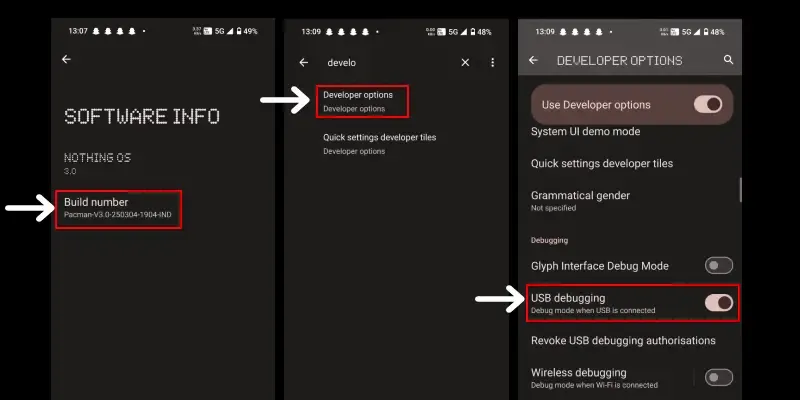
By following these steps, you can significantly reduce the risks associated with downloading APKs and enjoy your gaming experience without worry.
Recommended Sources
Finding reliable sources for downloading APKs can be challenging, but there are a few platforms that have established themselves as trustworthy within the gaming community:
- APKMirror: A widely-recognized platform, APKMirror ensures that all APKs are verified and safe for download. They also provide a comprehensive library of older versions of popular games.
- APKPure: This site offers a user-friendly interface and a vast selection of APKs, all of which are checked for malware and other security threats.
- Official Developer Websites: Whenever possible, download APKs directly from the developers' websites. This ensures that you are getting the most recent and secure version of the game.
While these sources have built a reputation for safety, it’s still essential to remain vigilant and follow the safety tips outlined above.
Conclusion
Downloading game APKs can significantly enhance your gaming library and offer access to titles that might not be available through traditional channels. However, the safety of your device should always be a priority. By understanding the potential risks of malware and following safe downloading practices, Malaysian gamers can enjoy their favorite games without compromising their security. Always verify your sources, check permissions, and utilize tools designed to protect your device. Stay safe and game on!
FAQ
What are the risks of downloading APKs?
The primary risks include malware infections, data privacy issues, and potential performance problems on your device.
How can I tell if an APK is safe?
Check the source of the APK, read user reviews, assess the permissions it requests, and use APK verification tools like VirusTotal to scan for malware.