Top 5 Ways to Stop Overheating While Gaming in 2026
For avid gamers in Malaysia, the thrill of immersive gameplay can sometimes be marred by the frustrating issue of overheating. Whether you're battling it out in the latest eSports title or exploring vast open worlds, keeping your gaming rig cool is essential for performance and longevity. In this article, we’ll explore the causes of overheating, preventive measures you can implement, product recommendations, maintenance tips, and answer some frequently asked questions to help you keep your gaming setup running smoothly in 2026.
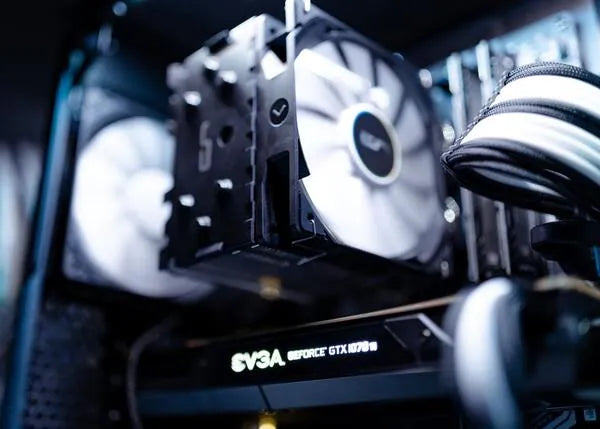
Causes of Overheating
Overheating is a common problem faced by gamers, and understanding its causes is the first step toward prevention. Here are some common reasons why gaming PCs and laptops may overheat:
- Insufficient Airflow: Poor airflow due to blocked vents or cramped spaces can lead to heat buildup. In Malaysia's humid climate, this is exacerbated, as hot air gets trapped around the system.
- High CPU and GPU Load: Running demanding games pushes your CPU and GPU to their limits, generating significant heat. This is especially common during intense gaming sessions or when using graphic-heavy applications.
- Outdated or Poor Cooling Solutions: Stock cooling fans may not be sufficient for high-performance setups. Over time, cooling components like thermal paste can degrade, reducing their effectiveness.
- Environmental Factors: Gaming in a hot room or on soft surfaces like beds or couches can block ventilation, leading to overheating issues.
Preventive Measures
To keep your gaming system from overheating, consider implementing these effective strategies:
- Optimize Airflow: Ensure that your gaming rig has ample space around it for airflow. Use a dedicated desk for your PC and avoid placing it in enclosed spaces.
- Upgrade Cooling Systems: Invest in high-quality cooling solutions such as aftermarket CPU coolers and case fans. Brands like Cooler Master and Corsair are well-known for their efficient products.
- Use Cooling Pads for Laptops: If you are a laptop gamer, a cooling pad can significantly lower temperatures during intense gaming sessions. Look for options with multiple fans for maximum efficiency.
- Monitor CPU and GPU Temperatures: Utilize software tools like MSI Afterburner or HWMonitor to keep an eye on your system's temperatures and adjust settings as needed.
- Adjust Fan Configuration: Ensure that your fans are configured correctly. Typically, front fans should draw cool air in, while rear fans should expel hot air out.
Product Recommendations
Investing in the right products can make a world of difference in maintaining optimal temperatures while gaming. Here are some recommended cooling products for Malaysian gamers:
- Cooling Pads: Brands like Cooler Master and Targus offer reliable cooling pads that provide additional airflow for laptops, helping to dissipate heat effectively.
- Thermal Paste: Applying high-quality thermal paste, such as Arctic MX-4 or Noctua NT-H1, can enhance heat transfer from your CPU/GPU to the cooler, reducing temperatures significantly.
- Aftermarket CPU Coolers: Consider investing in an aftermarket cooler from brands like Corsair or Noctua for improved cooling efficiency compared to stock coolers.
- High-Performance Case Fans: Opt for case fans with good airflow ratings. Brands like Noctua and Corsair provide fans that balance silence and cooling efficiency.
Maintenance Tips
Regular maintenance is crucial for keeping your gaming rig in optimal condition. Here are some tips to ensure your system remains cool:
- Clean Your System: Dust buildup can hinder airflow and cooling efficiency. Clean your PC or laptop regularly, focusing on fans and heat sinks. A simple compressed air canister will do wonders.
- Monitor Temperatures: Use software tools to check your CPU temperatures regularly. Keeping your CPU temperature below 80°C during gaming sessions is advisable.
- Replace Thermal Paste: If it’s been over a year since you applied thermal paste, consider reapplying it. This can improve heat transfer and cooling performance significantly.
- Check Fan Operation: Ensure that all fans are functioning correctly. Listening for unusual noises or checking for fan speed can help detect issues early.
Frequently Asked Questions
Here are some common queries related to gaming overheating:
What causes a gaming computer to overheat?
Overheating in gaming computers can result from several factors, including insufficient airflow, high CPU and GPU load from demanding games, outdated cooling systems, and environmental conditions like high room temperatures.
How can I clean my gaming PC to prevent overheating?
To clean your gaming PC, first, ensure it is powered off and unplugged. Use a can of compressed air to blow out dust from fans, vents, and heat sinks. Be cautious not to touch the components directly, and clean the inside of your case using a microfiber cloth. Regular cleaning can improve cooling efficiency by up to 20%!
By understanding the common causes of overheating and implementing the preventive measures and maintenance tips outlined above, Malaysian gamers can enjoy extended gaming sessions without the worry of overheating. Remember, a cool rig not only enhances performance but also prolongs the life of your beloved gaming hardware.